Record what arrived. Confirm what was delivered.
Receive goods and services against approved purchase orders in ACOS, or record Direct GRNs without a purchase order through CloudTASK. Keep receipt information available for review, with a configurable delivery check before a PO-linked supplier payment progresses through Accounts and further approval levels.
Choose the receiving process for the transaction.
GRN against an approved PO
Open an authorised purchase order and record the goods or services received. Confirm the full delivery or select the items and quantities received.
Follow PO-linked receiving →Direct GRN without a PO
Create a separate receipt record in CloudTASK with source, store, delivery reference, value and item details when the receipt is not linked to a purchase order.
Explore Direct GRN fields →Receive against an authorised purchase order.
The receiving screen keeps delivery information in the context of the approved order, supplier, department and project.
- Select the approved purchase order
Use the authorised purchase order listing to find the order. Views include your account, supplier and purchase order number, with date and department filters.
- Open Goods or Services Received
Review the order details and choose whether all items or services have been delivered, or only some items have been received.
- Record the delivered quantities
For selected items, enter the receiving quantity and review the total quantity received alongside the purchase order quantity.
- Submit the supplier invoice for review
Upload the supplier invoice for payment against the purchase order, with supporting delivery evidence, and submit it through the configured payment requisition workflow.
Full and partial deliveries
All Items Received / Services Delivered lets the user confirm the complete delivery.
Only Some Items Received lets the user identify the items and quantities actually received.
The detailed screen shows item code, store, description, current receiving quantity, total quantity received and PO quantity, giving the reviewer context for the receipt.
Record the delivery that has taken place so a partial delivery is represented by its selected items and received quantities.
Confirm delivery before the requisition moves through Finance.
Alongside item quantities, the first review level can be configured to approve the GRN and confirm that goods or services were delivered in good order when the supplier invoice is submitted for payment.
01 / Delivery review
The configured first reviewer, such as the project manager, confirms the GRN and satisfactory delivery of the goods or services.
02 / Accounts review
The payment requisition proceeds to the Accounts department for its review and approval of the supplier invoice and supporting information.
03 / Further approvals
The requisition continues through the remaining approval levels according to the configured payment workflow.
The first-level delivery check is configurable. Procurement approval, delivery confirmation and payment approval serve separate purposes; the exact roles and sequence are agreed for your organisation. CloudTASK provides configured web review and approval access.
Record goods received without a purchase order.
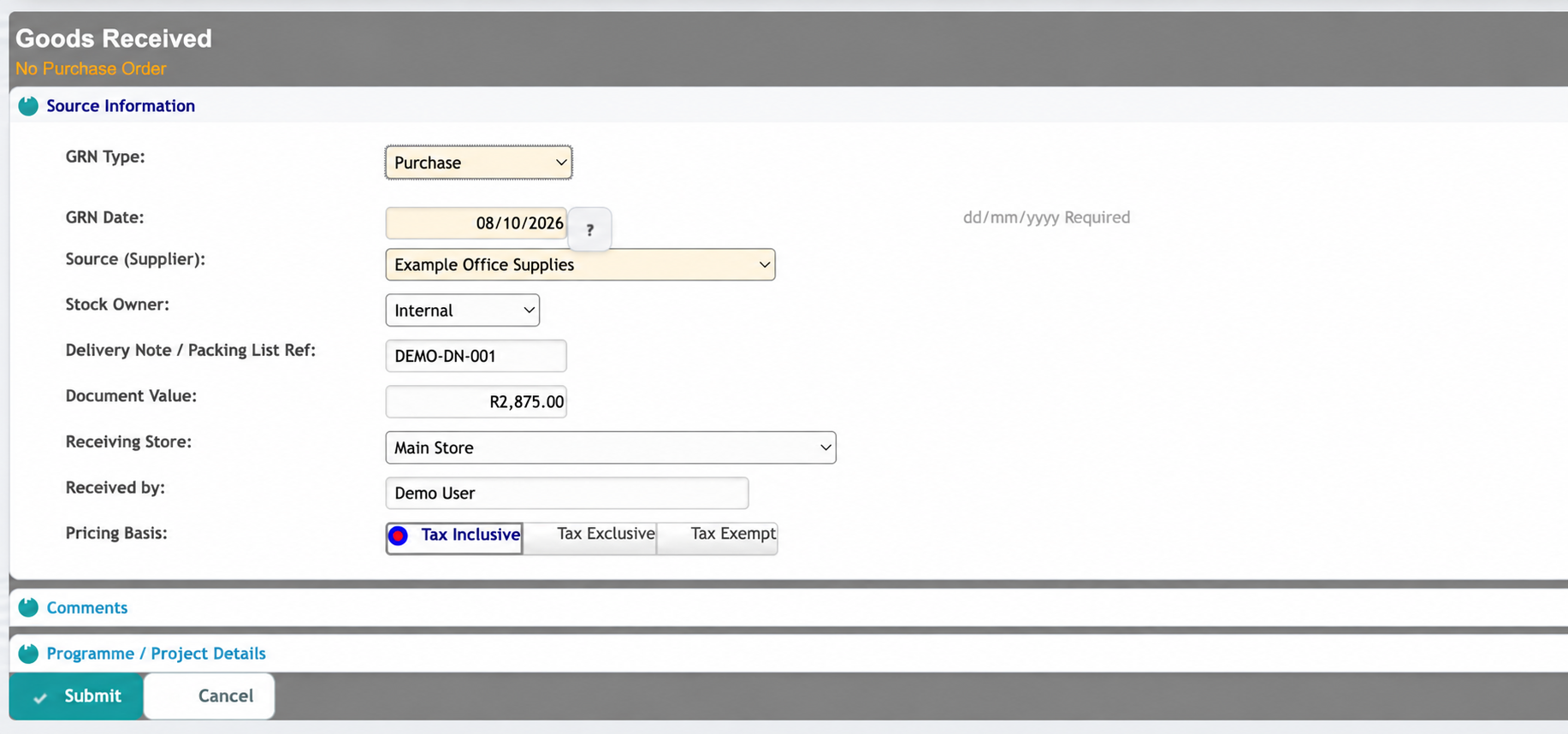
CloudTASK provides a dedicated Goods Received (No Purchase Order) register and capture form. Keep the source information, receiving details and item lines together in a Direct GRN.
Receipt header
- GRN type and receipt date
- Source or supplier and stock owner
- Delivery-note or packing-list reference
- Document value and receiving store
- Person who received the goods
- Tax-inclusive, tax-exclusive or tax-exempt pricing
- Comments and programme or project details
Item lines & register
- Store and item selection
- Expected or ordered quantity and quantity received
- Unit cost, tax code and tax amount
- Line variance information
- Register with document date, reference, status and capturing user
- Captured value, tax value, variance and document value
- Access to item lines and GRN printing
Keep delivery and invoice information connected.
Order, receipt & invoice
For PO-linked receiving, review what was ordered, what was received and what the supplier invoiced together. This supports three-way matching before payment approval.
Documents & transaction history
Attach supplier invoices and delivery evidence for review. Use the purchase order’s comments, tracking sheet and payment requisition history to follow related activity.
Supplier credit notes
Process a supplier credit note to record a reduction in the amount owed, such as a return or allowance. The credit appears on the PO tracking sheet and is incorporated into the supplier remittance.
Common receiving questions.
Can we record only part of a delivery?
Yes. In the ACOS PO-linked receiving screen, choose Only Some Items Received, then select the items and quantities received. The detailed view shows receiving quantity, total quantity received and PO quantity.
Can the first reviewer confirm that goods or services were delivered in good order?
Yes. The first review level can be configured to approve the GRN and satisfactory delivery when a PO-linked supplier invoice is submitted for payment. The requisition then progresses to Accounts and subsequent configured approval levels.
Can we record a receipt without a purchase order?
Yes. CloudTASK provides Direct GRNs without a purchase order, with receipt header information, item lines, values and GRN printing.
Which receiving functions are available on desktop and web?
The PO-linked receiving screens shown here are part of ACOS. Direct GRN capture is available through CloudTASK, which also provides configured goods received and payment review or approval functions. We will demonstrate the actions available to each role in your proposed setup.
Let’s demonstrate your delivery and review process.
Show us how your team receives goods, confirms services and submits supplier invoices. We will demonstrate the relevant receiving functions and discuss the review responsibilities, modules and access you need.
Email support@itcontact.co.za · Call +27 (0) 12 997 4444